Domain transfer
If you already have a domain with another provider (e.g., GoDaddy, Namecheap, Cloudflare), you can transfer it to Kotisivukamu's management. After the transfer, DNS settings are configured automatically and you don't need to worry about technical details.
A domain transfer can feel technical, but we're happy to help. Contact support (tuki@kotisivukamu.fi) and send us the transfer code, and we'll handle the transfer for you.
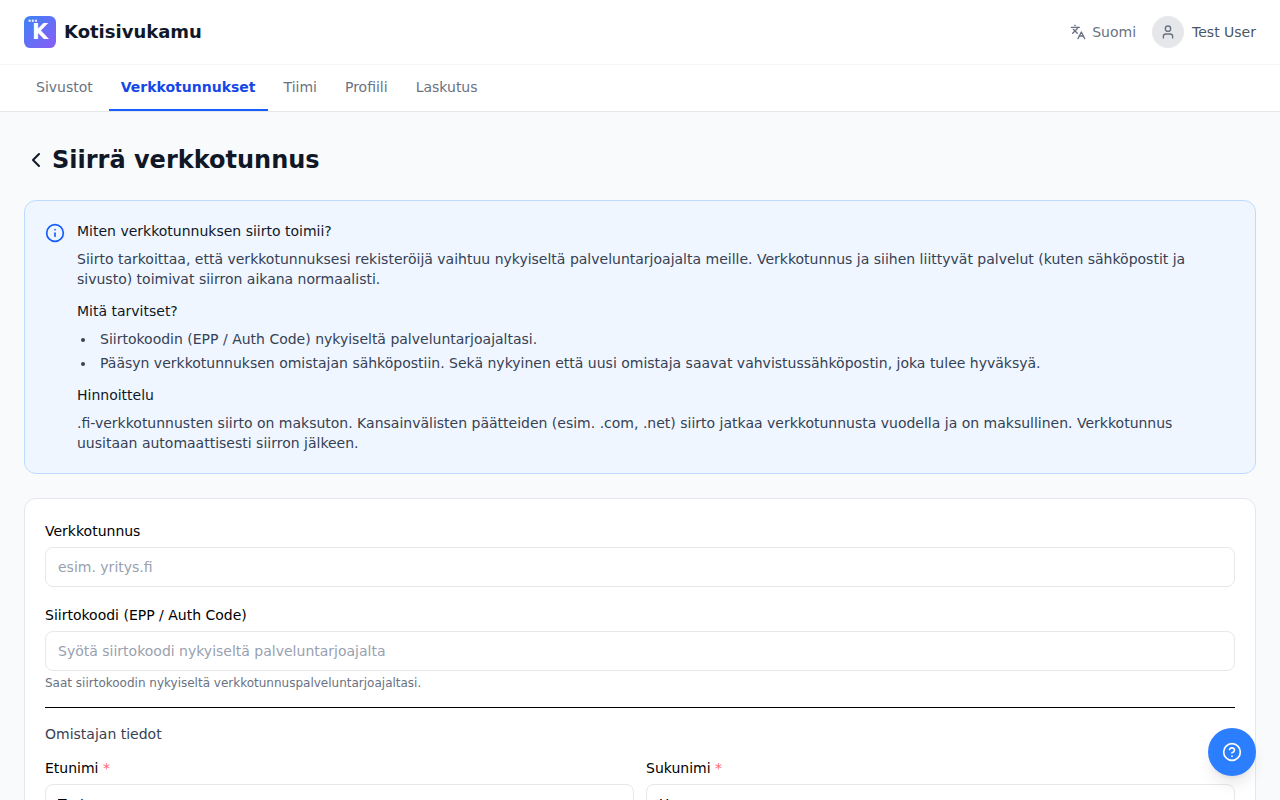
How does the transfer work?
A transfer means that your domain's registrar changes from the current provider to the registrar used by Kotisivukamu. The domain and its associated services (such as email and website) continue to work normally during the transfer.
What do you need?
- A transfer code (EPP / Auth Code) from your current provider. You can usually find this in your provider's dashboard or by requesting it from their customer service.
- Access to the domain owner's email. Both the current and new owner will receive a confirmation email that must be approved.
Making the transfer
- Go to the Domains page in the dashboard
- Click Transfer domain
- Enter the domain (e.g.,
company.com) - Enter the transfer code (EPP / Auth Code)
- Fill in the owner details
- Confirm the transfer
Pricing
- .fi domains: transfer is free
- International extensions (.com, .net, etc.): the transfer extends the domain by one year and is paid
The domain is automatically renewed after the transfer.
Where do I get the transfer code?
You get the transfer code from your current domain provider. Below are instructions for common providers:
- Domainhotelli: log into the dashboard, select the domain, and look for "Transfer code" or "Auth Code"
- Louhi: log into the OmaLouhi service, select the domain, and request a transfer code
- Nebula: log into the dashboard and find the transfer code in the domain settings
- Cloudflare: Dashboard -> Domain -> Transfer -> Get auth code
If you can't find the transfer code, contact your current provider and request it from them.
How long does the transfer take?
- .fi domains: usually from a few minutes to a few hours
- International extensions: up to 5-7 days, as the transfer requires confirmations from both parties
DNS records and email
When a domain is transferred, its DNS records (name server data) are also transferred. The system automatically copies public DNS records during the transfer, but some records (e.g., certain TXT records) may not be publicly visible and cannot be copied automatically.
If your domain is connected to an email service (e.g., Google Workspace, Microsoft 365) or other services, make sure before the transfer that all necessary DNS records (MX, TXT, CNAME) are saved. If you're unsure, contact us before the transfer (tuki@kotisivukamu.fi) and we'll verify together that no service is interrupted.
After the transfer
Once the transfer is complete, the domain will appear on the Domains page in the dashboard. You can then connect it to your site. DNS settings are configured automatically.