Connecting a domain to your site
Once you have a domain, you can connect it to your site. Connecting your own domain requires a paid subscription.
Subscription required
If your site is still on a trial period, adding a domain requires starting a subscription. The dashboard will guide you to choose a subscription option:
- Monthly subscription: 13.99 EUR/mo
- Annual subscription: 9.99 EUR/mo (billed 119.88 EUR/yr)
Billing starts only when you connect a domain to your site.
Adding a domain to your site
- Open your site in the dashboard
- Go to the Domains tab (in the Settings section)
- Enter your domain without the www prefix (e.g.,
company.com) - Click Add
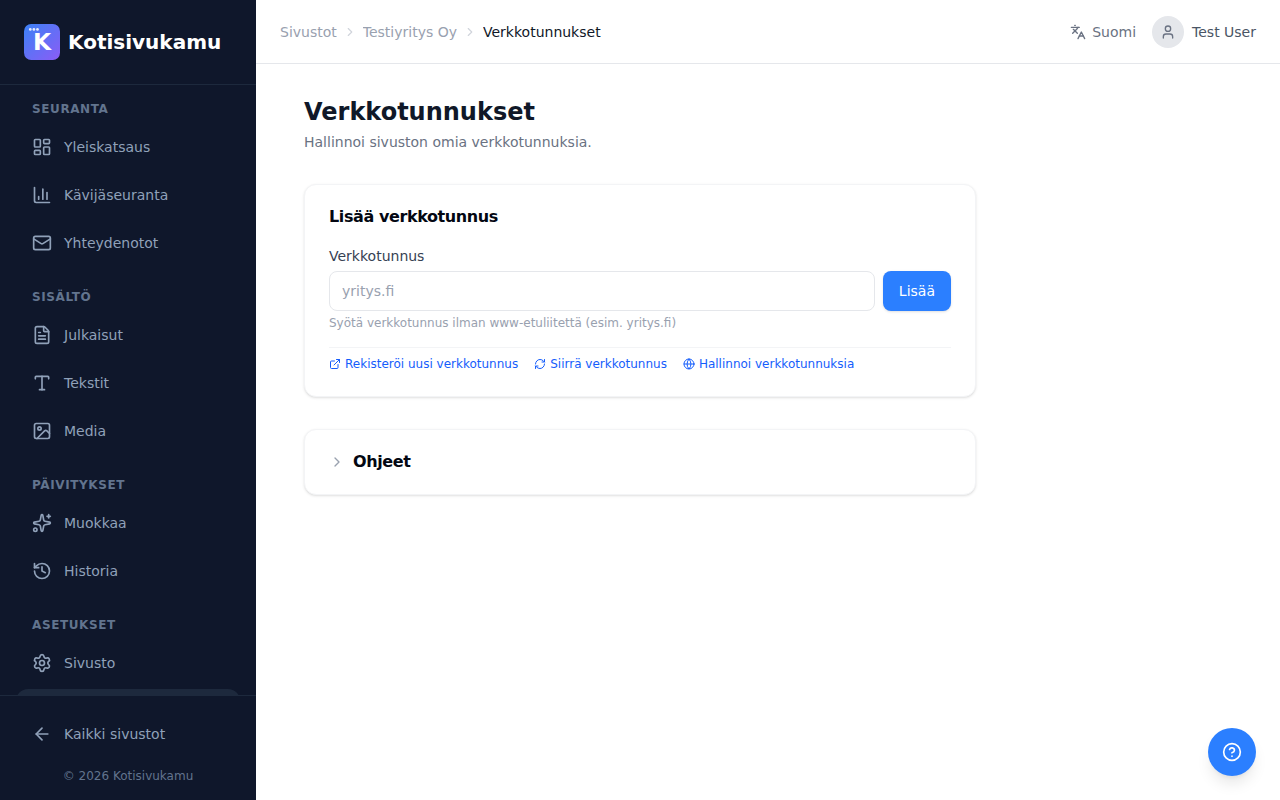
The page also contains links to domain registration, transfer, and management.
DNS settings
After adding the domain to your site, you need to point the domain to Kotisivukamu's servers. This is done differently depending on where your domain is registered:
Domain registered or transferred via Kotisivukamu
DNS settings are configured automatically. You don't need to do anything.
Domain registered elsewhere
You need to make DNS changes yourself from your provider's dashboard. See detailed instructions at DNS settings.
SSL certificate
An SSL certificate (HTTPS) is created automatically once DNS settings are correctly configured. This may take a few minutes.
Instructions section
The site's Domains page also has an Instructions section where you can see the required DNS records directly from the dashboard.