Visitor analytics
From the Visitor analytics page you can see your site's visitor statistics. The analytics work without cookies, so no separate cookie notice is needed and it doesn't affect the user experience.
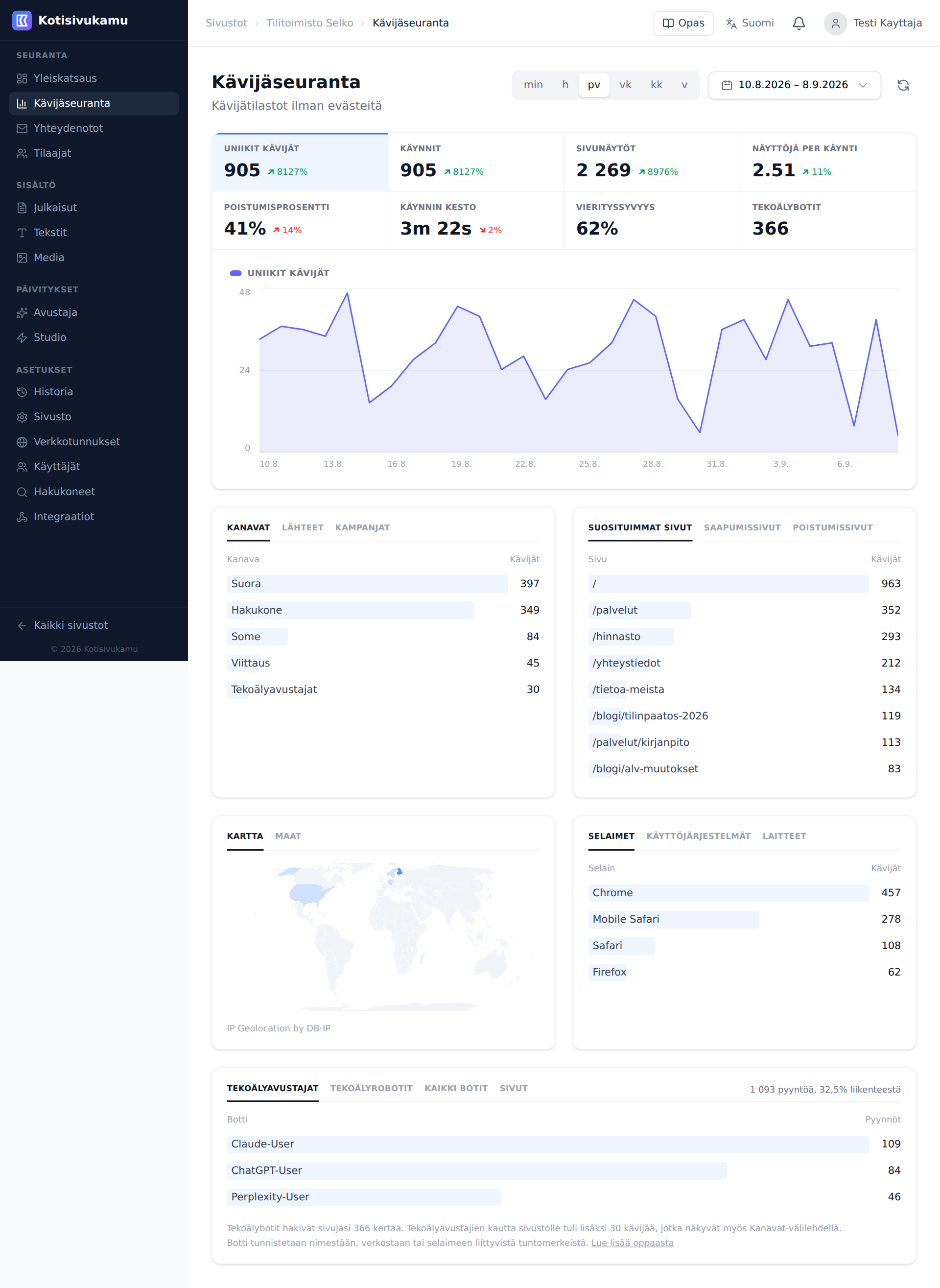
Statistics
There are eight figures at the top of the page. Each one is clickable and plots itself in the chart below.
- Unique visitors: how many different visitors
- Visits: how many visit sessions, the same visitor can come several times
- Pageviews: total number of page loads
- Views per visit: how many pages an average visit covers
- Bounce rate: how many leave immediately from the first page
- Visit duration: how long visitors spend on your site
- Scroll depth: how far visitors scroll down the page
- AI bots: how many times AI bots fetched your pages
Bots are not counted in the visitor figures. Bot traffic is shown in its own section.
Time range
You can view statistics at different resolutions: minute, hour, day, week, month and year. You can also select a specific date range from the calendar.
Where visitors come from
Channels tells you how a visitor ended up on the site:
- Direct: the visitor typed the address or used a bookmark
- Organic search and Paid search
- Organic social and Paid social
- Referral: a link from another site
- AI assistants: the visitor came from a link in an AI conversation, for example ChatGPT
The other tabs on the same card show individual Sources and Campaigns (links tagged with UTM parameters).
Pages, countries and devices
- Pages: top pages, entry pages and exit pages
- Countries: a world map and a country list
- Devices: browsers, operating systems and device types
Bots
A large part of today's web traffic is not people but bots and robots of various kinds: search engines, AI agents and scrapers. We show it to you. You can see what your site's traffic consists of as a whole and how much of it comes from robots.
The bot card at the bottom of the page lists bots by name. AI assistants are bots that fetch your page at the very moment someone asks an AI a question: ChatGPT, Claude and Perplexity answer with your site's content. AI crawlers collect content on their own schedule for an index or for training data. All bots shows the whole picture including search engines and scripts, and Pages shows which pages the bots fetch. The card is counted on the server, so it includes robots that never run JavaScript. That is most of them.
The bottom of the card also shows how many visitors arrived through a link in an AI assistant. The same figure is under Channels, because these are real people, not bots.
How a bot is detected
We use three signals.
The bot identifies itself. Some robots state their name honestly: Googlebot, Bingbot, GPTBot and so on. These appear in the list by name.
The request comes from a data centre. We look up which network a request's address belongs to and check it against a list of cloud and hosting providers. If something claims to be an ordinary browser but arrives from a server farm, it is not a person. These appear in the list as Unnamed bot (data centre).
Browser fingerprints are missing. Real browsers send certain metadata with every page load. A script that does not even try to look like a browser appears in the list as Unnamed bot (script).
The figures are deliberately cautious
We would rather count too few bots than too many. An ambiguous request is counted as a human, because wrongly calling a real reader a robot is a worse error than leaving a few bots in the visitor numbers. The true number of bots is therefore at least what the page shows.
Statistics in the Sites view
The dashboard home page (Sites view) also shows quick stats for each site: visitors today, yesterday, and in the last 30 days, along with trend graphs.
Cookie-free analytics
Kotisivukamu's visitor analytics don't use cookies or store personal data. This means:
- Your site doesn't need a cookie notice for visitor analytics
- Analytics are GDPR-compliant
- Visitors are not tracked across sites
A visitor's IP address is never stored. The address is turned into a one-way hash with a salt that rotates daily, and before it is discarded it is used only to look up a country and a network. Country data comes from DB-IP, and the analytics page carries the required "IP Geolocation by DB-IP" attribution. The server request log is kept for 90 days.
Third-party tracking tools
If you want to use third-party tools (e.g., Facebook Pixel, Google Analytics, Google Tag Manager) in addition to Kotisivukamu's built-in analytics, you can request their addition to your site via the chat tool.
Things to consider when using third-party tracking tools:
- Cookie banner required: if you add tracking tools that use cookies, your site will also need a cookie consent banner. Request this at the same time as the tracking tool.
- Privacy policy: you are responsible for keeping your site's privacy policy up to date. Make sure the policy covers all tracking tools you use and the data they collect.