Site terminology
When you ask Kamu to make changes, it helps to use the same terms we do — then Kamu knows immediately which part of the site you mean, and no time (or tokens) is wasted on guessing. This page is a glossary of the most common parts of a website.
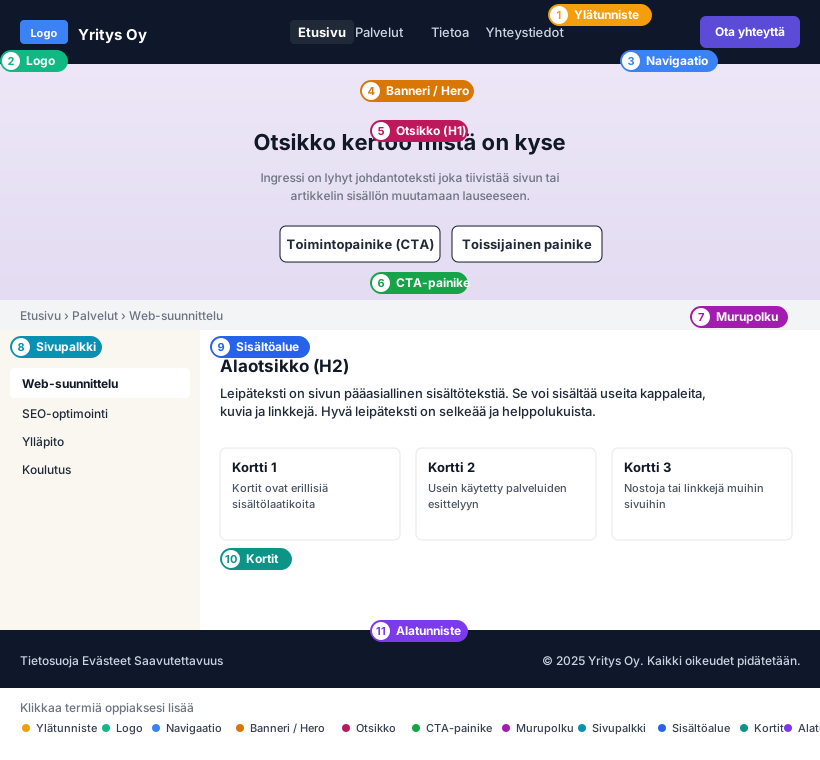
Parts of a site
- Header — the bar at the top of the site that looks the same on every page. Usually contains the logo, the navigation, and the main action.
- Logo — your company's mark on the left side of the header. Usually works as a link to the home page.
- Navigation (or tabs / menu) — links to the site's main pages, usually in the header.
- Banner or Hero — the large visual area at the top of a page that welcomes the visitor and says what the site is about.
- Heading (H1) — the most important heading of a page. Each page has only one H1 heading, and it says concisely what the page is about.
- CTA button (Call To Action) — a button-shaped link that guides the visitor to the most important action: "Contact us", "Request a quote", "Book an appointment".
- Breadcrumb — a navigation trail at the top of a page that shows where on the site you are (e.g. Home › Services › Web design).
- Sidebar — a vertical menu at the edge of a page, for example a list of subpages in services or a blog.
- Content area — the main text content of a page, including subheadings (H2, H3), body text, images, and links.
- Cards — separate content boxes used to highlight services, references, or blog posts.
- Footer — the bar at the bottom of the site that looks the same on every page. Often contains contact details, a copyright notice, and links to the privacy policy, cookies, and accessibility statement.
Using the terms in requests
The terms are especially useful in Studio and Chat when you want to target a change at a specific part. Examples:
- "Change the header background from white to light gray on all pages."
- "Add a CTA button with the text Book a free consultation to the front page hero."
- "Increase the font size of the services page H1 heading and center it."
- "Add a link to the accessibility statement in the footer."
- "Move the blog page sidebar from the right side to the left."
Terms save tokens
When you use a precise term, Kamu does not have to guess which part of the page you mean. One clear turn is usually much cheaper than a back-and-forth clarification conversation.